
Sharing Tab (Global Settings)
The Sharing tab in FMX Global Settings configures how photos, videos, and GIFs are delivered to guests via email and SMS. FMX supports both the built-in Foto Master Cloud delivery service and custom server endpoints for operators who need full control over their messaging infrastructure.
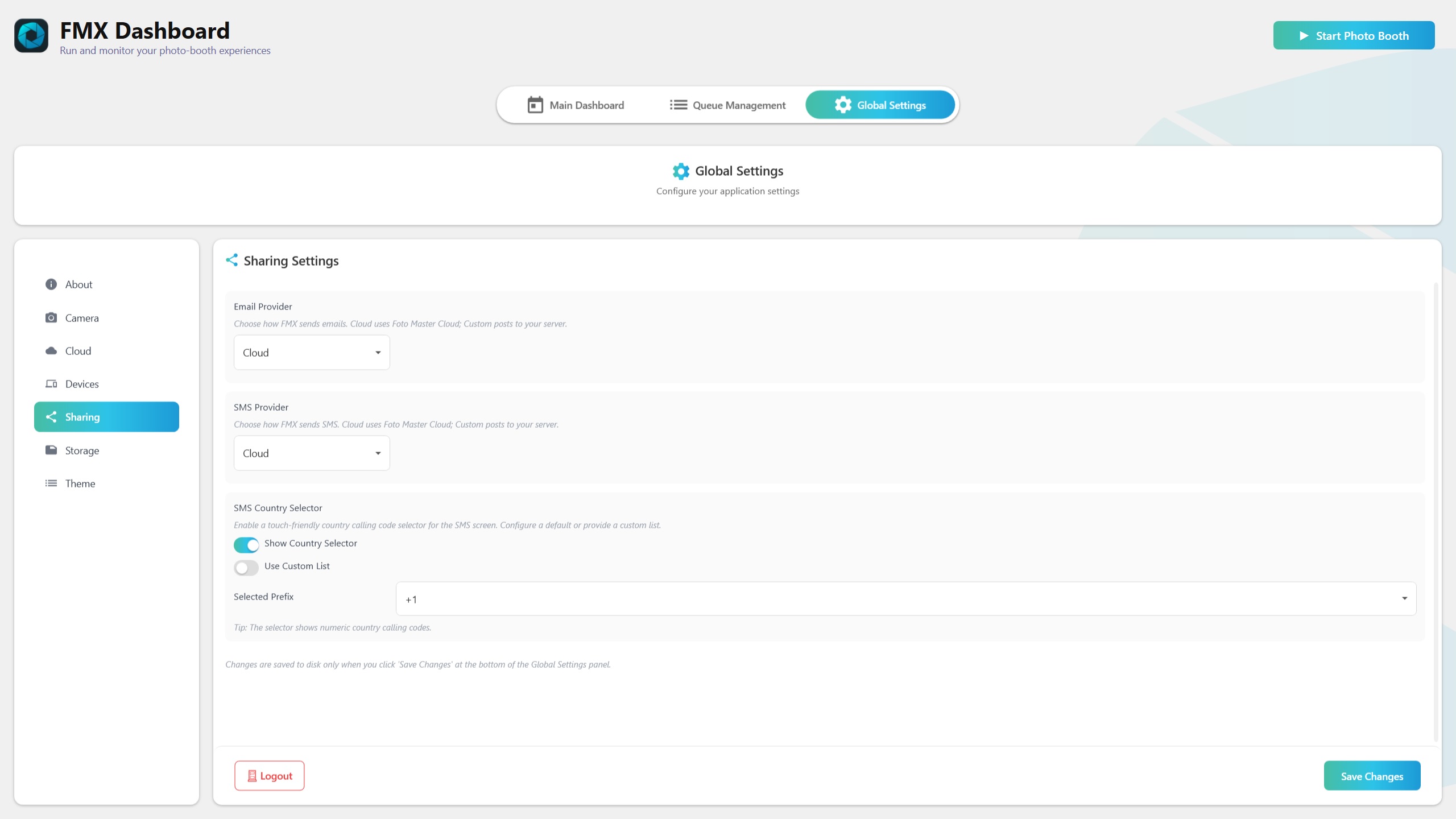
Email Provider
Choose how FMX sends email messages to guests:
- Cloud (default) -- Uses Foto Master's built-in cloud email servers. No additional configuration is needed. Emails are sent through Foto Master's managed infrastructure with delivery tracking.
- Custom -- Routes email delivery through your own HTTPS endpoint. Use this when you need to integrate with your own email provider, apply custom branding to email templates, or comply with specific sending requirements.
Custom Email Configuration
When Custom is selected:
- Server URL -- The HTTPS endpoint that receives email requests from FMX.
- X-API-Key -- The API key used to authenticate requests to your custom endpoint. This key is sent in the
X-API-KeyHTTP header with every request.
SMS Provider
Choose how FMX sends SMS messages to guests:
- Cloud (default) -- Uses Foto Master's built-in cloud SMS service. No additional configuration is needed.
- Custom -- Routes SMS delivery through your own HTTPS endpoint. Use this to integrate with your preferred SMS gateway.
Custom SMS Configuration
When Custom is selected:
- Server URL -- The HTTPS endpoint that receives SMS requests from FMX.
- X-API-Key -- The API key for authenticating with your custom SMS service.
SMS Country Selector
FMX includes a country selector for phone number formatting:
- Default Country Code -- Sets the default country calling code prefix (e.g.,
+1for the US,+44for the UK). This prefix is automatically applied when a guest enters a phone number without a country code. - Custom Country List -- Configure which countries appear in the country selector dropdown during the guest experience. Remove countries that are not relevant to your audience to simplify the selection.
All phone numbers are formatted using the E.164 international standard (e.g., +14155551234). This ensures reliable SMS delivery regardless of carrier or destination.
Media Delivery Method
FMX optimizes how media is attached to outgoing messages:
- URL-based delivery (preferred) -- When Cloud sync is enabled and the media has been uploaded, FMX includes a link to the cloud-hosted file rather than embedding the media directly. This produces smaller messages and faster delivery.
- Base64 encoding (fallback) -- If Cloud sync is not available or the upload has not completed, FMX encodes the media as a Base64 string and includes it directly in the message payload. This ensures delivery even without cloud connectivity, though messages will be larger.
Tip: For the best guest experience, enable Cloud sync for the media types you intend to share. URL-based delivery is faster, more reliable, and avoids message size limits that some carriers and email providers enforce.
Offline Gallery Actions
The Sharing tab also controls which actions appear under each media item in the Offline Gallery:
- Show Print -- Displays the print action in Offline Gallery.
- Show Email -- Displays the email action in Offline Gallery.
- Show SMS -- Displays the SMS action in Offline Gallery.
- Show QR Code -- Displays QR code sharing in Offline Gallery.
These options affect the Offline Gallery UI only. They do not change Cloud sync toggles or the event workflow itself.
See also: Cloud Tab, Storage Tab
Was this helpful?
Related articles
FMX for Windows: Customizing Your Experience
Everything at a photo booth event — the overlays, the countdown, the on-screen text, the email guests receive, the gallery they get a link to — is something you control. This guide
FMX for Windows: System Requirements
Before installing FMX on your Windows computer, make sure your system meets the requirements below. Meeting the recommended specifications will ensure smooth performance during eve
Installing FMX on Windows
When to Use First-time installation of FMX on a Windows PC Reinstalling FMX on the same machine Upgrading FMX to a newer version using the latest installer Requirements Windows 10
Building a FMX Preset From Scratch: Video Tutorial
This video covers the basics of building a workflow and layout in FMX — a good starting point before exploring the individual workflow step articles.
FMX for Windows: Quick Start Guide (Video)
This video walks through setting up your first FMX photo booth event from start to finish — in minutes. It covers logging in, creating a Cloud event, syncing, and going live. A fas