
Using Multiple Printers
FMX supports multiple printers connected simultaneously from the same computer. This guide explains how to set it up.
1. Connect your printers to your computer, and make sure they are online (Control Panel > Devices and Printers > Printers).
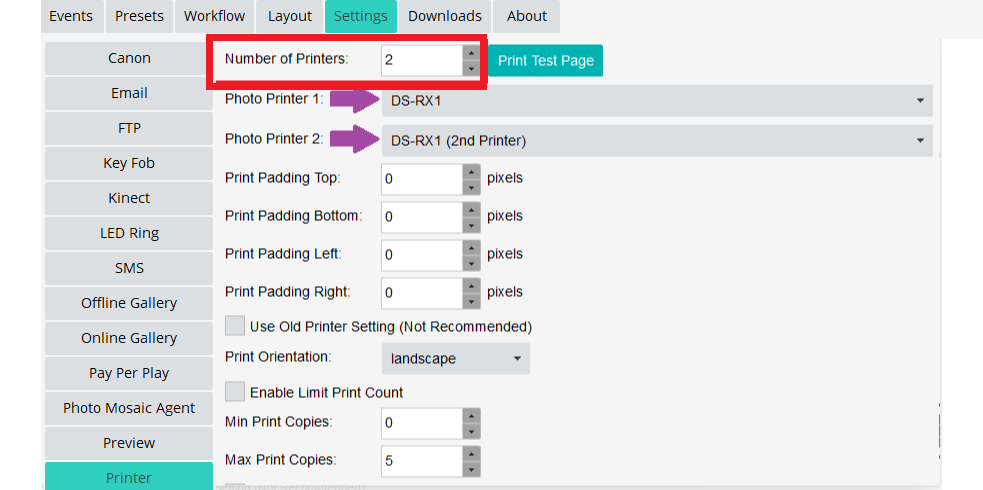
2. In the FMX software, go to the Settings tab > Printer.
3. Select the number of printers you will be using and each one in the drop-down menu (maximum 9 printers).
Was this helpful?
Related articles
Choosing the Right Camera for Your Photo Booth
Your camera is the single most important component affecting photo quality in your booth. Foto Master supports a wide range of cameras from Canon, Nikon, Sony, and USB webcams -- b
Camera Basics for Photo Booth Operators
You do not need to be a professional photographer to run a great photo booth, but understanding a few camera fundamentals will help you deliver consistently high-quality photos acr
FMX Supported Camera List
FMX supports cameras from Canon, Nikon, and Sony via their respective manufacturer SDKs, as well as any UVC-compliant USB webcam. This article provides the full compatibility list,
Camera Basics: The Exposure Triangle
This video explains the exposure triangle — aperture, shutter speed, and ISO — and how each setting interacts to control the final look of your photo. Recommended for operators who
Camera Basics: White Balance Settings
This video explains how different white balance settings affect the color temperature and overall quality of your photos — useful for any DSLR or mirrorless camera used with a Foto