
Adjusting the Printout and Using the Padding Solution
This article provides a brief explanation of your Air Graffiti display and printout resolution adjustments.
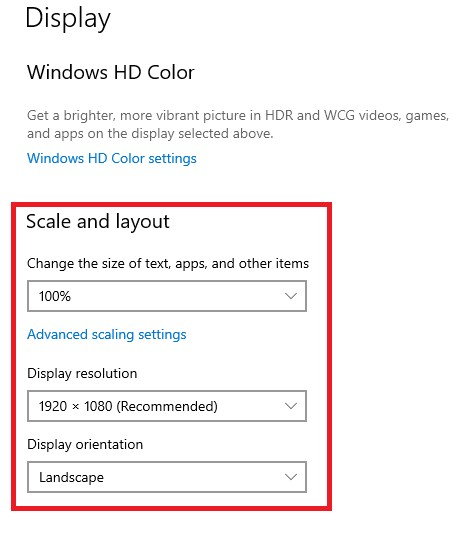
When using the AGwall Software, we are dealing with three different resolutions:
1. The Screen resolution: 1920x1080 (Width X Height)
2. The photo resolution: 2:3
3. The printout resolution: 4x6 (=2x3)
To get a good printout, the above need to match one another. The way to do that will be by adding page paddings to our AirGraffiti presentation.
The way to calculate the required padding on each side is very simple:
We have the three resolutions/aspect ratios:
Screen Photo Print out
HxW 1080x1920 2:3 4x6=(2x3)
This is the first calculation. We need to take the Width(Of the screen) times the Print Width, all of it divided by the Printout Height
.

Now, take the Width (of the Screen) minus the Width that we calculated ===>1920-1620 = 300.
Divide the result by 2 (equal padding on both sides of the screen) ==> 300/2 = 150. This result is the amount of padding we need to add to both sides - left and right in the photo tab within the Air Graffiti software:

Here is another example, this time for a 5x7 printout:
Here is another example of a calculation with a different printout aspect ratio: 5x7
We have the three resolutions/aspect ratios: Screen Photo Printout
WxH 1080x1920 2:3 5x7
This is the first calculation. We need to take the Width(Of the screen) times the Printout Width, all of it divided by the Printout Height.

Take the Width (of the Screen) minus the Width that we calculated ===>1920-1512 = 408
Divide the result by 2 (equal padding on both sides of the screen) ===> 408/2 = 204. This is the amount of padding we need to add to both sides - left and right in the photo tab within the Air graffiti software:

Was this helpful?
Related articles
AGWall Overview
AGWall is Foto Master's software for the Air Graffiti Wall -- an interactive digital graffiti experience where guests use physical spray can controllers to create virtual artwork o
Creating Games for the Air Graffiti Software
Hi owners, Do you like the games on AirGraffiti? Ever wanted to customize one of them to your liking? This article is for you! So let’s begin by understanding how the games are bui
Getting Started with AGWall
This guide walks you through setting up AGWall software and running your first Air Graffiti Wall event. System Requirements Windows PC (Windows 10 or later) A dedicated GPU is reco
Using EOS Utility with your Air Graffiti Software
Hi Guys! A great way to use the Air Graffiti software is to add a DSLR camera to the mix. You can use the DSLR camera with the "Live View" feature or the EOS utility. Check out thi